When accessing a specific domain, it might load correctly over mobile data, but redirect to a gambling site when using home Wi-Fi. Alternatively, a site might work perfectly for users abroad, while users in certain regions within China find it consistently resolving to an unfamiliar, incorrect IP address. Such phenomena are rarely the result of misconfigured domain settings; rather, they are typically caused by "DNS pollution"—a form of interference where the response is tampered with somewhere along the network path.
DNS pollution (also known as DNS cache poisoning) occurs when an attacker or an intermediary device intercepts a plaintext DNS query (sent via UDP port 53). The attacker injects a forged response packet before the authoritative server can reply, effectively pointing the domain to the wrong IP address. A notable incident disclosed by the National Computer Network Emergency Response Technical Team/Coordination Center of China (CNCERT/CC) in October 2026 serves as a prime example: an autonomous system (AS 402425) located outside the country hijacked traffic by announcing false routes, then manipulated DNS resolution results—redirecting users to gambling websites or malicious DNS servers—an issue that affected multiple provinces.
To defend against this, one must first understand how it works, learn how to identify it, and then implement the appropriate level of protection.
The Mechanics of DNS Pollution: Why Changing DNS Records Won't Help
When website administrators encounter resolution issues, their first instinct is often to modify the "A records" in their domain management console. However, if the root cause is DNS pollution, changing A records, adjusting TTL (Time-to-Live) values, or even switching to a different authoritative name server (NS) will likely prove entirely ineffective.
This is because the pollution occurs along the transmission path, not within the authoritative DNS configuration. The DNS records stored with your provider remain correct, and the authoritative server continues to provide the right information. The problem arises during the transit of the response packet from the authoritative server to the user: an intermediary device injects a forged response before the legitimate one arrives. The user’s operating system or local recursive DNS resolver accepts this "first-to-arrive" forged packet, and any subsequent, authentic response is typically ignored due to standard caching mechanisms.
This explains why DNS pollution often manifests with regional or ISP-specific variations: users sharing the same network path or routing segment are affected, while switching to a different network environment—such as moving to mobile data or accessing the site via an overseas node—often restores correct resolution. Diagnosis: Using `dig` for Cross-Verification
The most reliable core method for detecting DNS poisoning is not `ping`, but rather using `dig` to compare resolution results across different DNS servers. Since `ping` relies on the system's current DNS configuration, if the local DNS has already been poisoned, `ping` will return an incorrect IP address, rendering it useless for diagnostic purposes.
Step 1: Check the resolution result from your default local DNS:
dig yourdomain.com +shortRecord the returned IP address—this serves as your "suspect sample."
Step 2: Query trusted public DNS servers:
dig @8.8.8.8 yourdomain.com +short

dig @1.1.1.1 yourdomain.com +short

dig @223.5.5.5 yourdomain.com +short
Compare the results from these public DNS servers with the result obtained from your local default DNS.
Step 3: Evaluate the results:
- If the IP returned by the local DNS matches those from the public DNS servers, it is highly likely that no poisoning has occurred; the issue may instead lie with the server itself or the network routing.
- If the local DNS returns an anomalous IP while the public DNS servers return the correct one, this is a classic indicator of DNS poisoning.
Anomalous IPs often exhibit recognizable traits: they may be local or private network addresses (such as `127.0.0.1` or `192.168.x.x`); they may be unreachable via `ping` (resulting in 100% packet loss); or they may have an extremely short TTL (e.g., 5 seconds), whereas legitimate records typically have a TTL of around 300 seconds.
To further pinpoint where the poisoning occurs along the network path, you can use `dig +trace yourdomain.com` to trace the resolution process step-by-step, starting from the root servers. If the authoritative server returns the correct IP, but an anomalous result appears at an intermediate node, it indicates that the poisoning is occurring during the forwarding process—not at the level of your DNS provider.
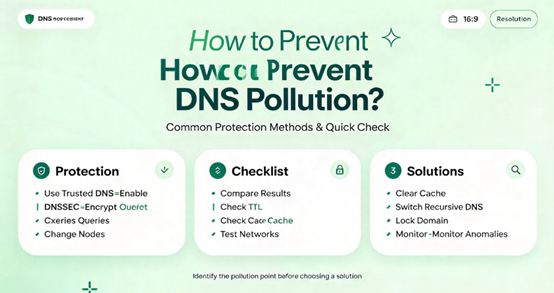
Protection: Layered Deployment—No Single "Silver Bullet"
Protecting against DNS poisoning requires selecting a strategy based on your role (e.g., a visitor or a website administrator) and the severity of the poisoning. There is no single measure that can address every scenario; a pragmatic approach involves implementing a layered, multi-tiered defense. Layer 1: Encrypted DNS (DoH/DoT) — The Most Direct and Effective Solution for Users
Plaintext UDP 53 is the fundamental prerequisite for DNS pollution, as it allows intermediary devices to inspect and tamper with query content. DoH (DNS over HTTPS) and DoT (DNS over TLS) encapsulate DNS queries within encrypted tunnels, preventing Deep Packet Inspection (DPI) devices from snooping on or altering the queries—effectively blocking the mechanism used for pollution.
Enabling "Secure DNS" in your browser (supported by Chrome, Edge, and Firefox) or deploying DoH globally at the router level can benefit all devices on the network. Common DoH endpoints include Cloudflare’s `https://cloudflare-dns.com/dns-query` and Alibaba Cloud’s `https://dns.alidns.com/dns-query`.
Layer 2: DNSSEC — Preventing Tampering, Not Eavesdropping
DNSSEC uses digital signatures for DNS responses, allowing recursive resolvers to verify that the results originated from an authoritative server and have not been altered in transit. For domains with valid signatures and a complete chain of trust, an attacker cannot replace the actual resolution result with a forged IP address.
However, DNSSEC has clear limitations: it does not encrypt query content (others can still see which domains you are querying), nor does it protect against DDoS attacks or the unauthorized modification of NS records resulting from a compromised registrar account. Furthermore, some ISPs’ recursive DNS servers may fail to perform DNSSEC validation or might even drop DNSSEC packets, undermining its protective value. Consequently, while DNSSEC is a vital component for preventing tampering, it cannot serve as a substitute for encrypted DNS.
Layer 3: Anycast and CDN — Enhancing Resilience Against Pollution
Standard, single-point DNS resolution paths are relatively static, making them more vulnerable to targeted interception. Implementing a distributed Anycast DNS system allows requests to be handled by the nearest node, shortening the communication path and making it significantly harder for attackers to precisely tamper with the results. When combined with a CDN—which masks the origin server's IP—even if resolution is compromised on certain network paths, other nodes can still provide accurate resolution, ensuring continued access. Layer 4: Backup Domains and Traffic Diversion—A Fail-Safe for Severe Contamination
If a primary domain experiences persistent, widespread contamination that cannot be resolved quickly through other measures, preparing a backup domain to divert traffic serves as a pragmatic fail-safe. In the event of a failure in the primary domain’s DNS resolution, users can be directed to a backup domain via established communication channels, preventing a complete service outage.
A Common Misconception: Contamination vs. Hijacking
It is important to distinguish between the two: DNS contamination typically manifests as tampered resolution results (i.e., the return of an incorrect IP address), whereas DNS hijacking may involve the interception of the resolution request itself, redirecting it to a different server. While the detection methods for both overlap, their root causes and remediation strategies differ. If a `dig` comparison reveals that the local resolver returns an internal network address or an obvious advertising IP—and the issue resolves after switching to an encrypted DNS service—it can generally be classified as contamination. If the request is hijacked in its entirety, the investigation must extend to the routing and network link layers.
From Diagnosis to Remediation: A Complete Workflow
When encountering resolution anomalies, follow these steps to quickly identify the issue and implement appropriate protective measures:
Step 1: Compare the results of `dig your-domain +short` and `dig @8.8.8.8 your-domain +short` to check for signs of contamination. Step 2: Temporarily enable DNS-over-HTTPS (DoH) in your browser or on your device to see if resolution returns to normal; if encrypted DNS bypasses the issue, the contamination is occurring within the plaintext DNS path. Step 3: If DNSSEC is enabled for the domain, verify that the resolver is actually performing validation; if it is not enabled, weigh the potential benefits against the risks regarding compatibility with various network operators. Step 4: For business-critical domains, consider implementing Anycast DNS or a CDN proxy to enhance network resilience. Step 5: In cases of severe contamination, prepare a backup domain as a fail-safe.
The reason DNS contamination often remains unpreventable is rarely the absence of a single "magic bullet" solution; rather, it is typically due to an over-reliance on a single layer of defense. A robust, multi-layered defense requires a four-fold approach: encrypted DNS to prevent blocking and tampering; DNSSEC to ensure the integrity of resolution results; Anycast and CDN to enhance network resilience against interference; and backup domain names as a fail-safe for worst-case scenarios.





