When a website directory or file suddenly becomes inaccessible, it may appear to be merely a technical glitch; however, the actual impact ripples outward, affecting user experience, search engine performance, business conversions, and brand trust. Many webmasters focus solely on "how to fix it" when problems arise, underestimating the losses incurred before the fix. Understanding these consequences is essential for correctly prioritizing troubleshooting and prevention efforts.
The most immediate impact is a breakdown in user experience and a loss of trust. A user clicks on a product category page only to receive a "403 Forbidden" error; they open the help documentation index and see a "404 Not Found"; they try to download a file and are told it is inaccessible. Such scenarios rarely offer a second chance. Research shows that if a page takes longer than three seconds to load, over half of mobile users will leave. Access failure is far worse than slow loading—it means the user cannot access the content at all. While one or two incidents might be dismissed as anomalies, repeated failures in the same directory lead users to view the site as "unreliable," prompting them to switch to a competitor. For e-commerce sites, SaaS platforms, and content sites, the cost of this lost trust far outweighs the cost of the server infrastructure itself.
From a search engine perspective, access failures directly interfere with crawling and indexing. If search engine crawlers frequently encounter 403 or 404 responses, they will reduce the site's crawl frequency and lower its trust rating. More critically, if directory-level access failures render numerous internal links unreachable, search engines may conclude that the site structure is broken, leading to reduced indexing or even the removal of existing pages from the index. For sites reliant on organic traffic, drops in rankings and traffic often persist even after the issue is resolved, as search engines require time to re-verify the site's stability and availability. If the outage lasts for several days, the recovery period can extend to weeks.
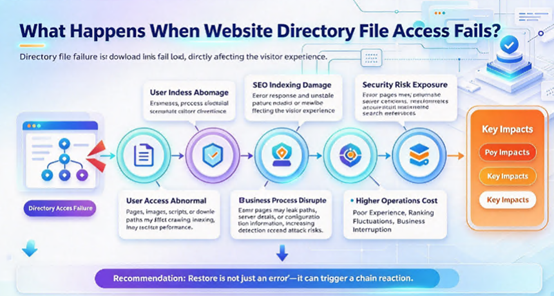
At the business level, the losses caused by access failures are quantifiable. For e-commerce sites, inaccessible category pages mean products cannot be browsed, potentially disrupting shopping cart and checkout flows; every minute of downtime translates into lost orders. For API services, broken endpoints directly cause errors for downstream clients; if these clients are paying customers or partners, such failures could even trigger compensation clauses within Service Level Agreements (SLAs). For content platforms and knowledge bases, a failure in directory access renders historical content unsearchable, leading to a simultaneous drop in advertising revenue and subscription conversions. A less obvious cost lies in customer support: the surge in tickets and inquiries during an outage forces technical teams to shift from "fixing the problem" to "explaining the problem," thereby slowing down recovery efforts.
Security implications are equally significant. Access failures are not always mere configuration errors; they can signal compromised permissions, deleted files, or server breaches. If directory permissions are mistakenly set to 777, or sensitive files are exposed in publicly accessible paths, the access failure is merely the "symptom," while the real risk is data leakage. Conversely, if an attacker controls the server, they might deliberately disable certain directories to mask malicious activity or use error pages for phishing redirects. Therefore, troubleshooting must go beyond simply restoring access; it requires checking for anomalous processes, unknown files, or unauthorized permission changes.
The drain on operational costs and team energy is often underestimated. Resolving a single directory access failure—from detection and diagnosis to repair and verification—typically consumes anywhere from tens of minutes to several hours of an operations engineer's time. Recurring issues force the team into "firefighting mode," preventing them from pursuing more valuable optimization work. The situation worsens without proper monitoring and logging, as troubleshooting becomes highly inefficient—involving repeated trial-and-error, guesswork, and rollbacks—with every attempt eating into the business's operational window. Over time, these hidden costs accumulate as technical debt, disrupting the team's overall delivery cadence.
The impact on the brand is even more profound. Users do not remember technical codes like "403" or "404"; they simply remember that "the site wouldn't load." In the age of social media, an outage lasting several hours can be captured in screenshots, shared widely, and amplified, creating negative word-of-mouth. For emerging brands, repairing such a negative impression can take months. For established brands, frequent access failures erode user confidence in platform stability, ultimately hurting renewal rates and customer retention.
How can these impacts be mitigated? The core strategy centers on "rapid detection, rapid recovery, and rapid verification." Deploy website monitoring tools to set up HTTP status code alerts for critical directories and files, enabling issue detection before widespread user complaints arise. Establish a robust backup mechanism to ensure that directory configurations and file contents can be quickly restored following a failure. Implement sound permission management protocols to prevent unauthorized permission changes caused by human error. Select stable infrastructure to minimize access anomalies resulting from server disk failures, network instability, or resource contention.
Jtti provides the underlying infrastructure support necessary for stable website operation. Its Hong Kong and US nodes utilize premium CN2 GIA lines with optimized direct connectivity across major carriers, maintaining a packet loss rate below 0.1% even during peak evening hours; this line stability ensures that user requests do not time out due to network fluctuations and makes directory access response times more predictable. The entire product line comes standard with enterprise-grade NVMe SSDs and dedicated bandwidth, ensuring consistent disk I/O and network throughput free from resource contention, thereby reducing the likelihood of access failures caused by insufficient server performance at the hardware level. A "same-price renewal" policy ensures predictable long-term operating costs—a crucial factor in operations planning for websites requiring continuous, stable performance.
Failures in accessing website directories and files are never merely minor issues that can be resolved with a quick fix. They impact user trust, search engine rankings, business revenue, security posture, and operational efficiency—and the repercussions in any of these areas can persist long after the technical issue itself has been resolved. Understanding these impacts is essential for prioritizing responses when problems occur and for implementing effective monitoring and backup strategies beforehand.





