After securing a Jtti trial product,many people make the same mistake:they log in via SSH,run a few casual commands,check that the CPU model and RAM capacity look correct,and assume the"testing"is done.However,a server's true performance cannot be judged solely by its specifications.Is the CPU oversold?Is the disk IOPS sufficient?Do network speeds drop during peak evening hours?Can the IP address unblock the platforms you need?Answering these questions requires systematic testing.
Jtti provides testing channels for dedicated server users,and the trial period is the ideal time to verify whether the product meets your business needs.Below,we outline the testing tools,commands,and evaluation criteria for three key dimensions:hardware,network,and streaming media.
Hardware Performance Testing:Verifying the Machine's Foundation
The goal of hardware testing is clear:to confirm whether the CPU is oversold,whether memory read/write speeds meet standards,and whether disk IOPS align with the advertised specifications.
The fastest method is to run the YABS benchmark script.YABS is currently the most widely used standardized benchmarking script in the VPS community;it automatically utilizes Geekbench 6 for CPU testing,fio for disk testing,and iperf3 for network testing,with a full run taking approximately 10 to 30 minutes.Execute the following command on the trial server:
curl-sL yabs.sh|bashIf the network connection fails,you can use an alternative URL.Once the test completes,focus on two specific figures.
For CPU performance,look at the Geekbench 6 single-core score.A single-core score below 400 indicates weak performance,potentially suggesting severe overselling;400–800 is average;800–1,200 is good;and anything above 1,200 is excellent.Real-world tests of Jtti’s Hong Kong nodes show solid,reliable single-core performance—more than sufficient for building WordPress sites or deploying AI tools like Hermes.
For disk IOPS,examine the 4K random read/write speeds.YABS tests read/write speeds across four block sizes—4K,64K,512K,and 1M—allowing you to determine the type of hard drive being used.Speeds below 200 MB/s indicate an HDD;200–500 MB/s indicates a standard SATA SSD;and 500–3000 MB/s indicates an NVMe SSD.Jtti equips its entire product line with enterprise-grade NVMe SSDs as standard,so the 4K random read/write figures from the trial unit should be significantly higher than the typical range for SATA SSDs.
If you want a quick assessment,you can start by running`bench.sh`,which yields results in five minutes;however,`bench.sh`does not measure CPU benchmark scores or return routing.
Use`sysbench`for memory testing.After running`apt install sysbench-y`,execute the memory write test:
sysbench memory--memory-block-size=1M--memory-total-size=10G runThe`throughput`value in the output represents memory bandwidth.If the figure is significantly lower than the norm for that generation of memory,it may indicate resource contention.
Network testing:Use MTR to verify return routing and`iperf3`to test bandwidth.
Network performance is a core selling point of Jtti products and the aspect requiring the most time during trial testing.It is recommended to use your VPS as the server and another machine under your control as the client;this allows you to measure the raw line throughput between the two points.
First,perform a Ping test to establish baseline latency.Run`ping-c 100[trial_unit_IP]`locally.For CN2 GIA lines from mainland China to Hong Kong,normal average latency is between 30–60ms;for CN2 GIA lines to the US West Coast,it is typically 130–180ms.If latency exceeds 300ms or packet loss exceeds 5%,the user experience will be noticeably affected.
Next,use MTR to verify the return route.This is a crucial step in confirming the authenticity of the network connection.Run the following command on the trial instance:
mtr-rwzc 300<your_local_public_IP>Jtti's Hong Kong nodes utilize a direct-connection strategy across the three major carriers(China Telecom,China Unicom,and China Mobile)using CN2 GIA,AS4837,and CMI respectively:Telecom uses CN2 GIA(dedicated 59.43 nodes),Unicom uses AS4837,and Mobile uses CMI;all three exit via Guangzhou to connect directly to the Hong Kong data center.If the return route on your trial instance consistently shows nodes starting with"59.43"without any"202.97"nodes mixed in,the line quality meets the standard.If a large number of"202.97"nodes(belonging to the 163 backbone network)appear,it indicates a route fallback.
There is a common misconception regarding MTR tests:a reported 30%packet loss at a specific intermediate hop does not necessarily reflect actual service packet loss.If subsequent hops return to 0%packet loss,it usually means that specific router is rate-limiting ICMP responses.A genuine link issue is indicated only when packet loss persists across all nodes from a certain hop onwards.
Finally,measure the actual bandwidth using iperf3.Start the server process on the trial instance with`iperf3-s`,and run the following on your local client:
iperf3-c<trial_instance_IP>-t 60-P 4Here,`-P 4`initiates four concurrent streams,and`-t 60`runs the test for 60 seconds.If the measured throughput reaches over 80%of the advertised value,the bandwidth delivery is considered good.Since Jtti provides dedicated bandwidth across its entire product line,the data measured on the trial instance will not be skewed by"bandwidth contention"from neighboring users.
The timing of the test is crucial.Be sure to re-run the test between 20:00 and 23:00 Beijing Time;this is the critical window for verifying the true quality of the connection.Anomalies during the evening peak usually occur at the cross-border egress or on the return path;screenshots and text logs can help the service provider determine whether the issue is caused by congestion or route instability.Streaming and IP Quality Checks:Verifying IP"Cleanliness"and Usability
If you plan to use this server to access platforms like Chat GPT or Netflix,a streaming unblocking test is essential.
We recommend using the**IPSentry**one-click check tool.It integrates three major risk databases—IPQS,Scamalytics,and ipapi—to simultaneously test for streaming unblocking and AI platform access,outputting the results in a bilingual(Chinese/English)color-coded table.Run the following command:
bash<(curl-sL https://raw.githubusercontent.com/ryantryor/IPSentry/main/ipsentry.sh)Pay attention to three key fields.For Netflix,a result of`Yes(Region:XX)`indicates perfect unblocking.For Chat GPT,a status of"Native Unblock"means the IP is a native IP for that region and can be used normally.Regarding risk scores:an IPQS Fraud Score of 0–30 indicates low risk,30–74 indicates medium risk,and a score above 75 suggests you should change the IP.
It is worth noting upfront that,according to third-party evaluations,Jtti's IPs are currently not"native"IPs;while they cannot unblock Gemini,they work directly with Chat GPT and Claude.If your business has a strict requirement for native IPs,you should verify this clearly during the trial phase.
An alternative tool is the**IPQuality**script.Maintained by developer xykt,it supports dual-stack(IPv4/IPv6)queries and checks for unblocking capabilities on platforms such as TikTok,Disney+,Netflix,and Chat GPT.It also integrates risk scores from multiple databases,including IPinfo,AbuseIPDB,and IPQS.Run the following command:
bash<(curl-Ls https://Check.Place)-I 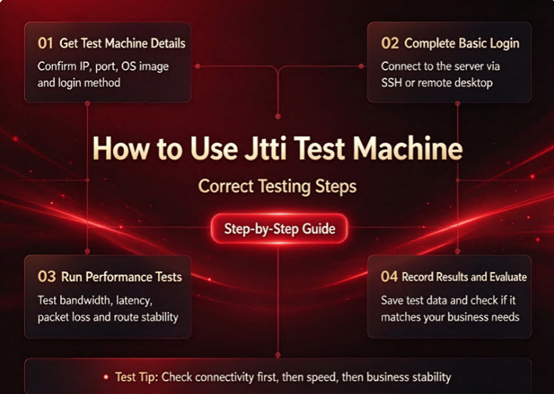
Resources and Recommended Testing Schedule for the Jtti Trial
Jtti provides test IPs for various nodes,allowing you to perform preliminary checks before applying for the trial.The test IP for Hong Kong Cloud is`177.4.12.254`;for Tokyo,Japan,it is`103.110.221.254`;for the US,it is`177.3.40.254`;and for Singapore,it is`38.47.226.254`.
Once you receive the trial server,we recommend the following testing schedule:
Day 1:Assess hardware specifications and performance.Run YABS to obtain CPU benchmark scores and disk IOPS,confirming that the hardware configuration matches the specifications.Simultaneously,use MTR to check the return route and verify if the network path meets expectations.
On the second day,test the network at different times.Run MTR and iperf3 tests during the morning,afternoon,and evening peak hours,recording data on latency,packet loss,and bandwidth.Performance during evening peak hours is the critical factor determining the actual user experience.
On the third day,run actual application workloads.Once the hardware and network are verified,deploy your actual application.If you plan to host a website,install WordPress to test page load speeds;if deploying AI tools,test API response times and stability.
Monitor stability throughout the trial period.A single test only reflects the status at a specific moment.During the trial,run`uptime`every few hours to check system load and`ss-s`to monitor connection status,watching for any abnormal fluctuations.
Finally,please note that Jtti trial products are intended solely for legitimate,compliant functional testing and performance evaluation;they must not be used for any purpose that violates laws,regulations,terms of service,or acceptable use policies.Approaching the trial resources with clear testing objectives ensures you derive maximum value from this period.
A trial is not merely about"playing around for free";it is the best opportunity to verify—at minimal cost—whether the product aligns with your business needs.Hardware benchmarks confirm the foundation,MTR and iperf3 validate the network path,and streaming media checks confirm IP availability.By testing across these three dimensions,you can make data-driven decisions rather than placing an order based on guesswork.





